POSTS
Kubelet VolumeManager机制流程分析
By ZhongsJie
- 5 minutes read - 2091 wordsKubelet VolumeManager机制流程分析#
Kubelet Volume相关逻辑主要在VolumeManager模块
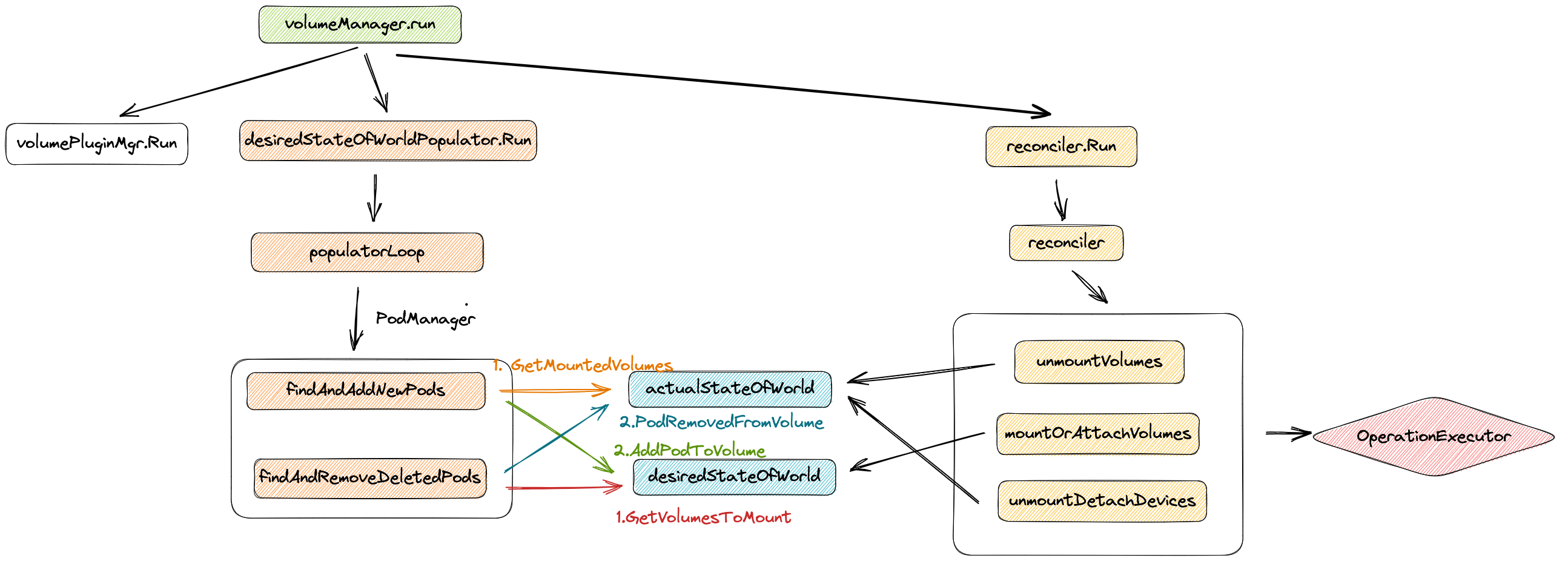
- Mount 阶段则由对应节点的 kubelet 中的 volume manager 处理。
- volume manager 获取 node.Status.VolumesAttached 属性值,发现 volume 已被标记为 attached, 就会进行 mount 操作
- k8s中涉及存储的组件主要有:attach/detach controller、pv controller、volume manager、volume plugins、scheduler。每个组件分工明确:
- attach/detach controller:负责对 volume 进行 attach/detach
- persistent volume controller:负责处理 pv/pvc 对象,包括 pv 的 provision/delete
- kubelet volume manager:主要负责对 volume 进行 mount/unmount
- volume plugins:包含 k8s 原生的和各厂商的的存储插件
挂载流程#
第一步是在准备 volume(宿主机目录),第二步才是真正的挂载操作。
- k8s 中的 Volume 属于 Pod 内部共享资源存储,生命周期和 Pod 相同,与 Container 无关,即使 Pod 上的容器停止或者重启,Volume 不会受到影响,但是如果 Pod 终止,那么这个 Volume 的生命周期也将结束。
- 整个挂载流程需要 kube-controller-manager、 kubelet 以及 cri 共同完成,一个完整的流程大致可分为以下 两个步骤:
- 1)远程存储挂载至宿主机
- 1)Attach
- 由 controller 执行,将远程块存储作为一个远程磁盘挂载到宿主机
- 2)Mount
- 由 kubelet 执行,将远程磁盘格式化并挂载到 Volume 对应的宿主机目录
- 一般是在 /var/lib/kubelet 目录下
- 1)Attach
- 2)将宿主机目录挂载至 Pod 中
- 由 CRI 执行,将宿主机上的目录挂载到 Pod 中
- 1)远程存储挂载至宿主机
- NFS 本身就是文件系统就可以省略 Attach
远程存储挂载至宿主机#
k8s 的 api 就是只有使用 PV 的时候执行该流程
- 基础阶段
- 阶段一:Attach,挂载磁盘
- 阶段二:Mount,格式化磁盘并 mount 至宿主机目录
- 最终的准备好的volume都会放到以下目录
/var/lib/kubelet/pods/<Pod的ID>/volumes/kubernetes.io~<Volume类型>/<Volume名字>
volumeManager相关结构体#
// volumeManager implements the VolumeManager interfacetype
volumeManager struct {
   // kubeClient is the kube API client
   kubeClient clientset.Interface

   // 实现初始化好的插件管理对象
   volumePluginMgr *volume.VolumePluginMgr

   // 包含了vm想要达成的一个状态:那些卷应该被连接,那个pods会引用这些卷。从 podManager获取数据
   desiredStateOfWorld cache.DesiredStateOfWorld

   // 包含了实际的vm状态。在  attach,  detach, mount, and unmount  操作的时候记录这些信息
   actualStateOfWorld cache.ActualStateOfWorld

   // 异步执行 attach, detach, mount,unmount操作
   operationExecutor operationexecutor.OperationExecutor

   // 运行异步定期循环,通过使用operationExecutor 来协调desiredStateOfWorld与actualStateOfWorld
   reconciler reconciler.Reconciler

   //  运行异步定期循环,使用 PodManager 填充 desiredStateOfWorld
   desiredStateOfWorldPopulator populator.DesiredStateOfWorldPopulator

   // csiMigratedPluginManager keeps track of CSI migration status of plugins
   csiMigratedPluginManager csimigration.PluginManager

   // intreeToCSITranslator translates in-tree volume specs to CSI
   intreeToCSITranslator csimigration.InTreeToCSITranslator
}
actualStateOfWorld#
保存当前node的所有实际挂载状态
type actualStateOfWorld struct {
	nodeName types.NodeName
	// 存储所有卷挂载情况
	attachedVolumes map[v1.UniqueVolumeName]attachedVolume
		-> mountedPods map[volumetypes.UniquePodName]mountedPod
}
desiredStateOfWorld#
期望挂载状态
type desiredStateOfWorld struct {
	// 期望挂载的情况
   volumesToMount map[v1.UniqueVolumeName]volumeToMount
	   -> podsToMount map[types.UniquePodName]podToMount
}
reconcile#
func (rc *reconciler) reconcile() {
   // Unmounts are triggered before mounts so that a volume that was
   // referenced by a pod that was deleted and is now referenced by another
   // pod is unmounted from the first pod before being mounted to the new
   // pod.
   // 遍历 node 上的 mountedVolume,检查 pod 还在不在,如果 pod 不在了就把对应 volume unmount
   rc.unmountVolumes()

   // Next we mount required volumes. This function could also trigger
   // attach if kubelet is responsible for attaching volumes.   // If underlying PVC was resized while in-use then this function also handles volume
   // resizing.
   // 遍历需要 mount 或者 attach 的 volume,看下是不是真的 mount 或者 attach了,没有就执行 mount 或者 attach.设备需要先 attach,因此 kubelet 这里会一直阻塞,产生一个叫做 VolumeNotAttached 的错误
   rc.mountOrAttachVolumes()

   // Ensure devices that should be detached/unmounted are detached/unmounted.
   // unmountDetachDevices:如果某个设备的多个 volume 都是 unmount 状态那就把该设备 detach 掉
   rc.unmountDetachDevices()

   // After running the above operations if skippedDuringReconstruction is not empty
   // then ensure that all volumes which were discovered and skipped during reconstruction
   // are added to actualStateOfWorld in uncertain state.
   if len(rc.skippedDuringReconstruction) > 0 {
      rc.processReconstructedVolumes()
   }
}
desiredStateOfWorldPopulator#
运行异步定期循环,使用 PodManager 填充 desiredStateOfWorld
wait.PollUntil(dswp.loopSleepDuration, func() (bool, error) {
   done := sourcesReady.AllReady()
   dswp.populatorLoop()
	   -> {
			   dswp.findAndAddNewPods()
			   dswp.findAndRemoveDeletedPods()
			}
   return done, nil
}, stopCh)
findAndAddNewPods#
func (dswp *desiredStateOfWorldPopulator) findAndAddNewPods() {
	//...
	for _, pod := range dswp.podManager.GetPods() {
	   //...
	   // 填充 desiredStateOfWorld
	   dswp.processPodVolumes(pod, mountedVolumesForPod)
		//...
		-> uniqueVolumeName, err := dswp.desiredStateOfWorld.AddPodToVolume(
   uniquePodName, pod, volumeSpec, podVolume.Name, volumeGidValue, seLinuxContainerContexts[podVolume.Name])
	}
}
findAndRemoveDeletedPods#
遍历所期望状态下的所有pod,如果informer中不再存在,则将其移除
func (dswp *desiredStateOfWorldPopulator) findAndRemoveDeletedPods() {
	//...
	pod, podExists := dswp.podManager.GetPodByUID(volumeToMount.Pod.UID)
	if podExists {
		// ...
		// 判断pod中容器是否都已经终止
		if !dswp.podStateProvider.ShouldPodRuntimeBeRemoved(pod.UID) {
		   continue
		}
		// 是否保持终止pod的卷  node上注解KeepTerminatedPodVolumesAnnotation
		if dswp.keepTerminatedPodVolumes {
		   continue
		}
	}
	removed := dswp.actualStateOfWorld.PodRemovedFromVolume(volumeToMount.PodName, volumeToMount.VolumeName)
	if removed && podExists {
		continue
	}
	// 删除期望的状态,以及相关记录
	dswp.desiredStateOfWorld.DeletePodFromVolume(
volumeToMount.PodName, volumeToMount.VolumeName)
	dswp.deleteProcessedPod(volumeToMount.PodName)
}
mountOrAttachVolumes#
Kubelet的Volume挂载流程,调用OperationExecutor执行MountVolume
MountVolume#
func (oe *operationExecutor) MountVolume(...) error {
	-> func (og *operationGenerator) GenerateDetachVolumeFunc(...)(...) {
		volumePlugin, err :=
	   og.volumePluginMgr.FindPluginBySpec(volumeToMount.VolumeSpec)
		...
		mountVolumeFunc := func() volumetypes.OperationContext {
		   // 获取挂载卷插件
			volumePlugin, err := og.volumePluginMgr.FindPluginBySpec(volumeToMount.VolumeSpec)
			...
			// 检查node亲和性
			affinityErr := checkNodeAffinity(og, volumeToMount)
			// 获取mounter,所有的挂载类型都拥有
			volumeMounter, newMounterErr := volumePlugin.NewMounter(...)
			//获取attacher,所有的卷都需要挂载以及接触挂载,但是不是所有的都需要attacher
			attachableVolumePlugin, _ := og.volumePluginMgr.FindAttachablePluginBySpec(volumeToMount.VolumeSpec)
			...
			deviceMountableVolumePlugin, _ := og.volumePluginMgr.FindDeviceMountablePluginBySpec(volumeToMount.VolumeSpec)
			// 核心 设置挂载文件(创建路径并且写入内容)
			mountErr := volumeMounter.SetUp(...)
				// setup失败后会删除卷
				-> func (b *configMapVolumeMounter) SetUpAt(dir string, mounterArgs volume.MounterArgs) error {
					...
					// 获取configmap资源,如果不是可选项找不到的时候会报configmap not fount错误
					configMap, err := b.getConfigMap(b.pod.Namespace, b.source.Name)
					// 拼装payload  map[string]volumeutil.FileProjection对象(文件名和文件投影信息),但没有指定mode的时候采用默认模式
					payload, err := MakePayload(b.source.Items, configMap, b.source.DefaultMode, optional)
					// 创建挂载点,获取当前卷的所有挂载路径
					// 1. 不能再rootfs之外创建目录
					// 2. 检查每个装载点,看看它是否嵌套在这个卷下面
					volumeutil.MakeNestedMountpoints(b.volName, dir, b.pod)
				}
		}
	}
}